

You sit down with your tablet, tap the screen, and within seconds your grandchild’s face appears — smiling, laughing, reaching toward you through the pixels. No cords and no cable. It’s a signal you can’t see, working quietly in the background. That’s Wi-Fi — but what is Wi-Fi, really? In this simple guide to Wi-Fi, we’ll explain how Wi-Fi works and why it’s become such a quiet essential in modern life.
More than 95% of homes in Canada and the United States are now online, and most use Wi-Fi to share that connection. It’s become as ordinary — and as essential — as electricity or running water. And yet, for something so common, Wi-Fi can still feel mysterious. Those blinking lights, long passwords, and strange terms — router, modem — can sound confusing or even a little intimidating. If you’ve ever worried about pressing the wrong button or “breaking” something, you’re not alone.
What is Wi-Fi and How Does It Work?
Wi-Fi stands for “wireless fidelity.” It’s just a fancy term that means wireless internet — a way to connect to the online world without needing any cords or cables. Before Wi-Fi, every computer had to be physically plugged into the wall to reach the internet. If you wanted to move to another room, you had to drag the cord with you. Wi-Fi changed all that. Instead of relying on wires, it uses radio waves — the same kind of invisible waves that carry sound to your radio or pictures to your TV antenna. These radio waves fill your home, passing information back and forth between your devices (like your tablet or smart TV) and a small box called a router. The router’s job is to act as the middleman — or better yet, your household’s personal mail carrier.
How Wi-Fi Works: A Simple Step-by-Step Guide
Here’s a simple way to picture it: image your home network as a tiny post office, where letters (information) are constantly being sent and received.
- The Internet Service Provider – The Highway to the Post Office: Every home with internet service is connected to a provider. They provide access to the internet into your home through a cable, fiber-optic line, or sometimes a satellite dish. You can think of this line as the main delivery route connecting your home to the entire postal system — all the sorting centers, trucks, and mail carriers your “internet company” uses to move information where it needs to go.
- The Modem – The Local Post Office: When that internet signal reaches your home, it arrives at a small device called a modem. The modem is like your local post office — it takes the big stream of mail arriving from the outside world and sorts it into something your household can use. It knows where to send letters and how to read the “addresses” (data signals) coming from your internet provider. Without it, the rest of your home wouldn’t know where to send or receive anything.
- The Router – Your Personal Mail Carrier: Next comes the router, often built into the same box as the modem. If the modem is the post office, the router is your personal mail carrier. It delivers all those sorted messages from the post office to your individual devices — your tablet, your smart TV, your phone. The router does this not with envelopes and stamps, but with invisible radio waves that fill your home like an unseen postal route in the air. The closer your device is to the “carrier,” the stronger and faster the delivery. But just like real mail, obstacles — thick walls, metal, distance — can slow things down.
- Your Device -The Mailbox: Every connected device — your tablet, phone, or computer — acts as a mailbox. It has a built-in receiver that “listens” for its own mail and sends new letters out. When you tap or click, your device writes a tiny digital letter — a request — and hands it off to your router. A moment later, a reply comes back: the webpage, the photo, the video you asked for.
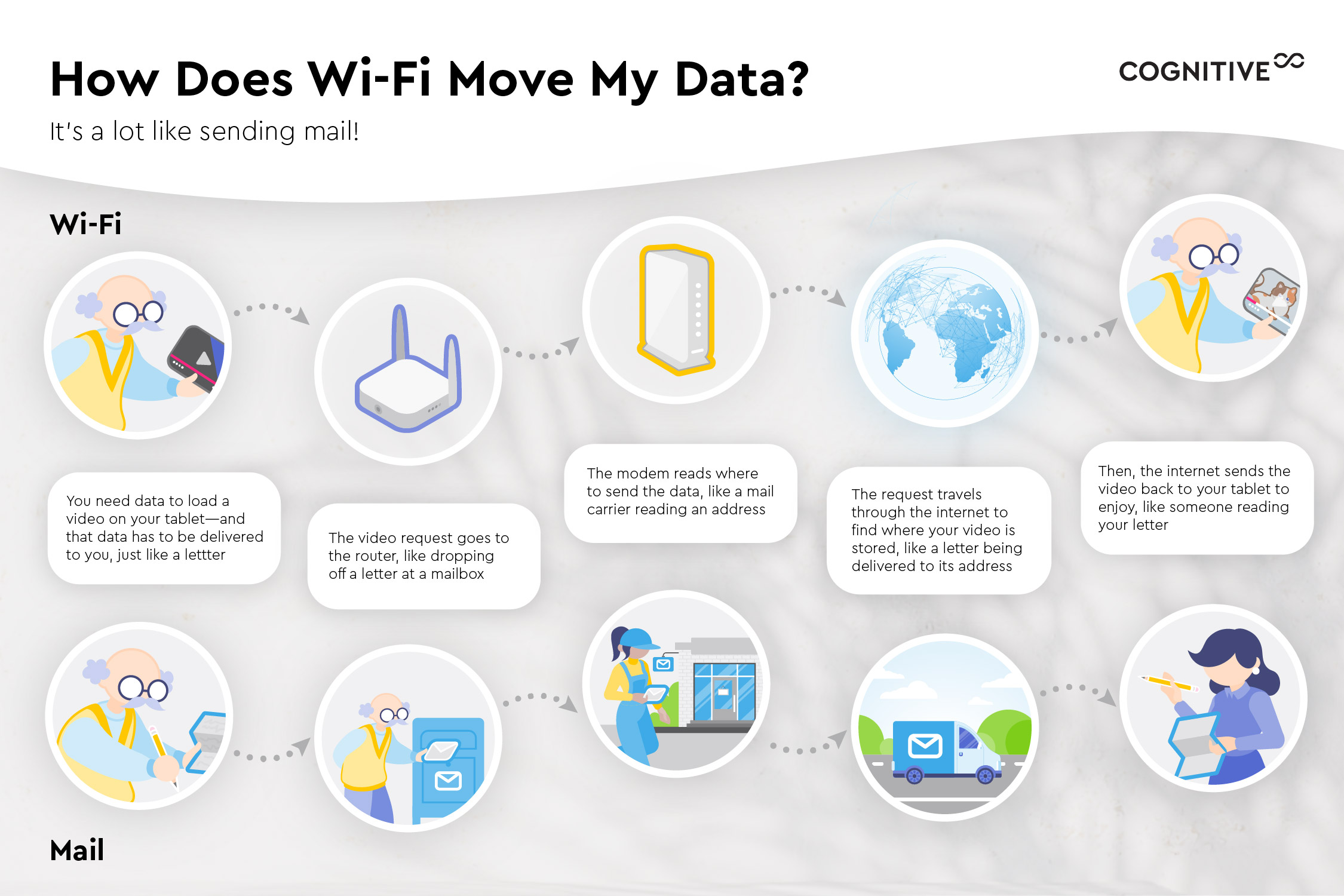
Visualizing how Wi-Fi moves data with a mail carrier example
Why Wi-Fi Is the Invisible Helper in Everyday Life
Once you see how all these pieces work together — the provider’s “postal highway,” your modem, your router, and your devices — it becomes clear why Wi-Fi feels almost invisible. It’s constantly sorting, carrying, and delivering millions of tiny messages without ever asking for your attention. And yet, this quiet system powers so much of your everyday life: the laughter that reaches you through a video call, the music playing in the background, the appointment reminders that keep you on track. Wi-Fi is the invisible helper that keeps your digital world running smoothly, working faithfully behind the scenes so you can focus on the moments that matter.